Configure the HTML (Text) Module
DNN Version: 09.02.00
04/13/2020 • 1 minute to read
Contributors


04/13/2020
• 1 minute to read
• Contributors
Steps
Go to the page containing the module to configure. Edit the page.
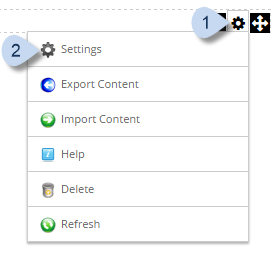
In the module's action menu bar, go to Manage (gear icon) > Settings.
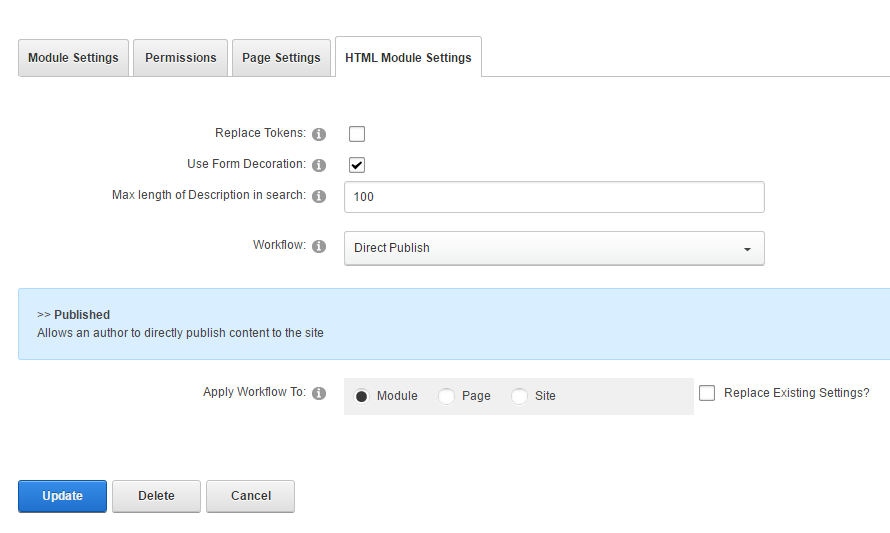
Go to the HTML Module Settings tab.
Note
If checked, inline editing and module caching are also disabled.
Field Description Replace Tokens If checked, tokens in the HTML text are replaced. Max Length of Description in Search The maximum number of single-byte characters from the text that are displayed in site search results. In DNN Platform only Use Form Decoration If checked, the HTML controls in the module's contents are decorated to match the style in other instances of the HTML module in the site. Workflow The predefined workflow to use for content creation using this module. Workflows are defined by content managers or administrators in the Workflow Management module. Apply Workflow To - Module. The selected workflow is used only for the current instance of the module.
- Page. The selected workflow is used for all HTML module instances in the same page.
- Site. The selected workflow is used for all HTML module instances in the entire site.